
Uncloud
Docker simplicity. Multi-machine power.
Docker simplicity. Multi-machine power.
 ## 💫 Why Uncloud?
Modern cloud platforms like Heroku and Render offer amazing developer experiences but at a premium price. Traditional
container orchestrators like Kubernetes provide power and flexibility but require significant operational expertise. I
believe there's a sweet spot in between — a pragmatic solution for the majority of us who aren't running at Google
scale. You should be able to:
* **Own your infrastructure and data**: Whether driven by costs, compliance, or flexibility, run applications on any
combination of cloud VMs and personal hardware while controlling your data and maintaining the cloud-like experience
you love.
* **Stay simple as you grow**: Start with a single machine and add more whenever you need without changing your
workflow. No worrying about highly-available control planes or complex YAML configurations.
* **Build with proven primitives**: Get production-grade networking, deployment primitives, service discovery, load
balancing, and ingress with HTTPS out of the box without becoming a distributed systems expert.
* **Support sustainable computing** 🌿: Minimise system overhead to maximise resources available for your applications.
Uncloud's goal is to make deployment and management of containerised applications feel as seamless as using a cloud
platform, whether you're running on a $5 VPS, a spare Mac mini, or a rack of bare metal servers.
## 🚀 Quick start
1. Install Uncloud CLI:
```bash
brew install psviderski/tap/uncloud
# or using curl (macOS/Linux)
curl -fsS https://get.uncloud.run/install.sh | sh
```
2. Initialise your first machine:
```bash
uc machine init root@your-server-ip
```
3. Deploy your app from a Docker image and publish its container port 8000 as HTTPS using `app.example.com` domain:
```bash
uc run -p app.example.com:8000/https image/my-app
```
4. Create a DNS A record in your DNS provider (Cloudflare, Namecheap, etc.) that points `app.example.com` to your
server's IP address. Allow a few minutes for DNS propagation.
That's it! Your app is now running and accessible at https://app.example.com ✨
5. Clean up when you're done:
```bash
uc ls
# Copy the service name from the output and run the rm command:
uc rm my-app-name
```
If you want to fully uninstall Uncloud on a machine, run:
```bash
uncloud-uninstall
```
View the [user guide](docs/user_guide.md) for more information.
## ⚙️ How it works
Check out the [design document](docs/design.md) to understand Uncloud's design philosophy and goals.
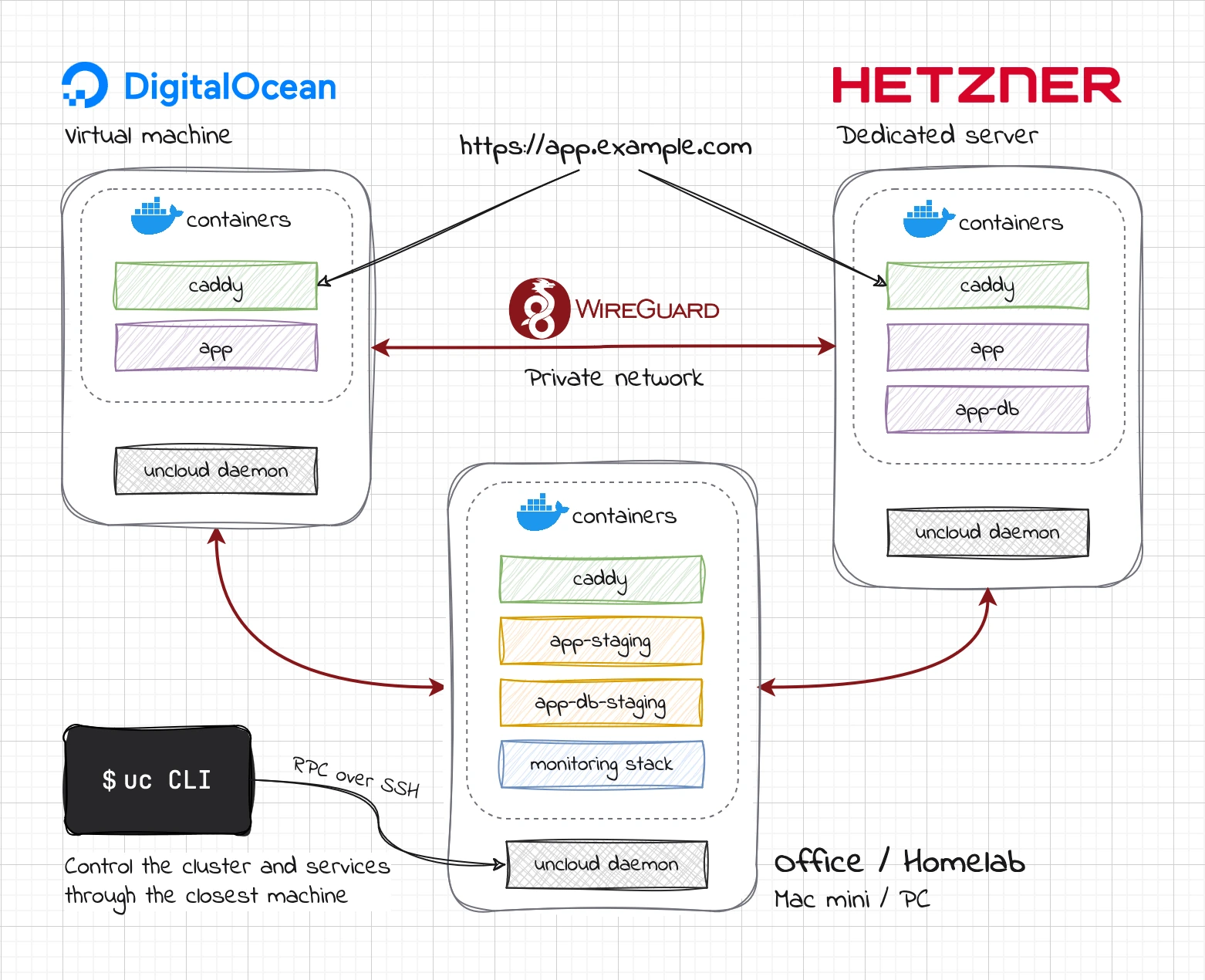
Here is a diagram of an Uncloud multi-provider cluster of 3 machines:
## 💫 Why Uncloud?
Modern cloud platforms like Heroku and Render offer amazing developer experiences but at a premium price. Traditional
container orchestrators like Kubernetes provide power and flexibility but require significant operational expertise. I
believe there's a sweet spot in between — a pragmatic solution for the majority of us who aren't running at Google
scale. You should be able to:
* **Own your infrastructure and data**: Whether driven by costs, compliance, or flexibility, run applications on any
combination of cloud VMs and personal hardware while controlling your data and maintaining the cloud-like experience
you love.
* **Stay simple as you grow**: Start with a single machine and add more whenever you need without changing your
workflow. No worrying about highly-available control planes or complex YAML configurations.
* **Build with proven primitives**: Get production-grade networking, deployment primitives, service discovery, load
balancing, and ingress with HTTPS out of the box without becoming a distributed systems expert.
* **Support sustainable computing** 🌿: Minimise system overhead to maximise resources available for your applications.
Uncloud's goal is to make deployment and management of containerised applications feel as seamless as using a cloud
platform, whether you're running on a $5 VPS, a spare Mac mini, or a rack of bare metal servers.
## 🚀 Quick start
1. Install Uncloud CLI:
```bash
brew install psviderski/tap/uncloud
# or using curl (macOS/Linux)
curl -fsS https://get.uncloud.run/install.sh | sh
```
2. Initialise your first machine:
```bash
uc machine init root@your-server-ip
```
3. Deploy your app from a Docker image and publish its container port 8000 as HTTPS using `app.example.com` domain:
```bash
uc run -p app.example.com:8000/https image/my-app
```
4. Create a DNS A record in your DNS provider (Cloudflare, Namecheap, etc.) that points `app.example.com` to your
server's IP address. Allow a few minutes for DNS propagation.
That's it! Your app is now running and accessible at https://app.example.com ✨
5. Clean up when you're done:
```bash
uc ls
# Copy the service name from the output and run the rm command:
uc rm my-app-name
```
If you want to fully uninstall Uncloud on a machine, run:
```bash
uncloud-uninstall
```
View the [user guide](docs/user_guide.md) for more information.
## ⚙️ How it works
Check out the [design document](docs/design.md) to understand Uncloud's design philosophy and goals.
Here is a diagram of an Uncloud multi-provider cluster of 3 machines:
